
If you’re bringing on a new accountant, or changing what your current one is allowed to do for you, the ATO now needs you to approve that link yourself. It’s called client-to-agent linking, and it exists for a good reason: it stops anyone attaching themselves to your ABN without your say-so.
The catch is that we can’t do this step for you. You have to nominate us from your own ATO Online services for business account. Here’s exactly how it works.
Does this apply to you?
Client-to-agent linking applies to all entity types with an ABN — companies (including strata title bodies), partnerships, trusts, not-for-profits, joint ventures, co-operatives, SMSFs and APRA-regulated super funds. It has applied to all of them since 13 November 2023.
Sole traders, individuals and entities without an ABN don’t need to do this at this stage.
You’ll need to nominate an agent when you:
- engage a new tax agent, BAS agent or payroll service provider
- change the authorisations you give your existing agent
Before you start: myID and RAM
Two things need to be in place before you can nominate anyone.
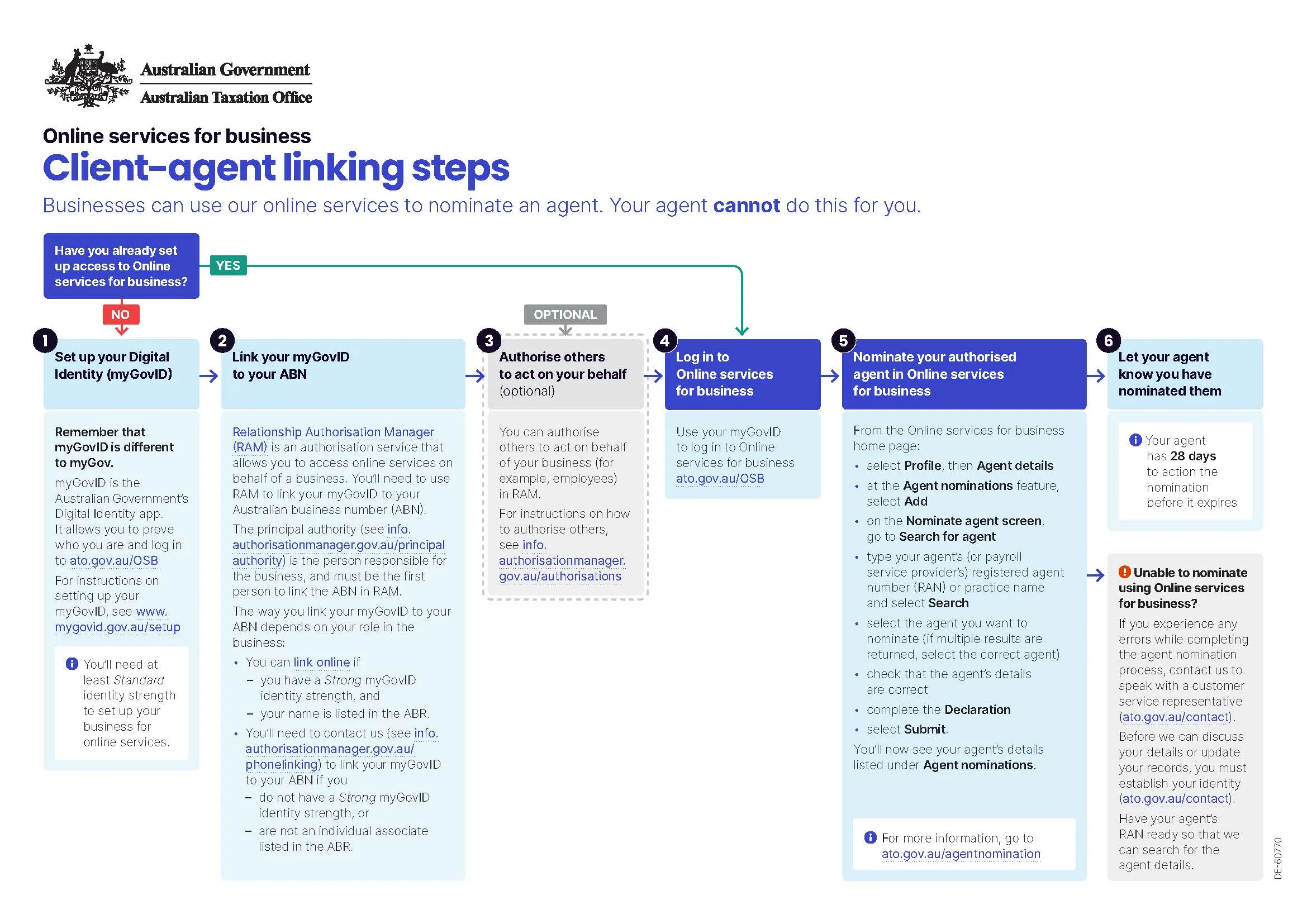
1. A myID with at least Standard identity strength. myID is the Australian Government’s digital identity app. It was called myGovID until it was renamed — same app, new name — and it is not the same thing as your myGov account. You can set it up at myid.gov.au.
2. Your myID linked to your ABN in Relationship Authorisation Manager (RAM). RAM is what tells the ATO you’re authorised to act for the business. The principal authority — usually the business owner, director or public officer — must be the first person to link the ABN in RAM.
You can link online if you have a Strong identity strength and your name is listed in the Australian Business Register. If you don’t have Strong identity strength, or you aren’t listed as an individual associate in the ABR, you’ll need to phone the ATO to get linked instead.
The good news: this part is a one-off. Once your myID and RAM access are sorted, you won’t need to do it again.
How to nominate us: the six steps
- Set up your myID — skip this if you already have one.
- Link your myID to your ABN in RAM.
- Authorise others (optional) — you can give employees or others access to act on behalf of the business in RAM.
- Log in to Online services for business at ato.gov.au/OSB using your myID.
- Nominate us as your agent. From the Online services for business home page:
- select Profile, then Agent details
- at the Agent nominations feature, select Add
- on the Nominate agent screen, go to Search for agent
- type our registered agent number (RAN) or practice name — All Square Accountants — and select Search
- select us from the results, and check the details are correct
- complete the Declaration and select Submit
- Let us know you’ve done it. This is the step people forget. The ATO doesn’t tell us automatically, so the nomination can quietly expire while everyone waits on everyone else.
You have 28 days
Once you submit the nomination, we have 28 days to add you as a client before it lapses. If we need longer, you can use the Extend feature in Online services for business, which adds another 28 days from the day you extend.
And if it does expire before we get to it, there’s no penalty and nothing to undo — you simply nominate again.
If something goes wrong
If you strike an error while completing the nomination, contact the ATO and ask to speak with a customer service representative. You’ll need to establish your identity before they can discuss your details, and it helps to have our RAN ready so they can find us quickly.
Not sure where to start?
Most of the friction in this process is in the myID and RAM setup, not the nomination itself. If you’re stuck at any point, get in touch — we’ll walk you through it, and we’ll give you our RAN so you’re not hunting for it mid-process.
Once the link is in place, we can act on your tax and compliance obligations.